Event Loop
Related: Node.js Event Loop · Browser vs Node.js Event Loop · Event Loop Interview Q&A
Senior Interview Summary
The event loop is the runtime scheduling mechanism that lets JavaScript remain single-threaded from the page’s point of view while still coordinating async work, browser APIs, user input, timers, promises, rendering, and background browser threads.
The senior-level answer is not just “callbacks go into a queue.” The real point is that the browser has a limited main thread budget. Smooth UX depends on understanding which work runs immediately, which work is queued as a task, which work runs as a microtask, and when the browser gets a chance to render.
2-3 Minute Interview Script
“I think about the browser event loop as the scheduler around the JavaScript call stack and the rendering pipeline. JavaScript execution itself is single-threaded on the main thread, but the browser has other threads for networking, parsing, decoding, input, and so on. When those systems need to notify the page, they schedule work back onto the main thread.
One event loop turn starts by running a task, such as initial script execution, a timer callback, a click handler, or a message event. When that task finishes and the call stack is empty, the browser drains the microtask queue. Promise callbacks,
queueMicrotask, andasync/awaitcontinuations are common microtasks. Microtasks are important because they run before the browser moves on to another task and before it usually gets a chance to render.Rendering is a separate phase the browser may choose to run between tasks.
requestAnimationFramecallbacks are tied to that rendering opportunity and run before paint, so they are appropriate for visual updates.setTimeoutis not a paint primitive; it just schedules a future task, and the browser may delay it.The performance consequence is that async does not automatically mean non-blocking. A long task blocks input and paint. A runaway promise chain can also starve rendering because microtasks are drained to completion. In production I keep event handlers small, split expensive work, avoid layout thrashing, use
requestAnimationFramefor frame-aligned visual work, use workers for CPU-heavy work, and measure long tasks and interaction latency.”
Core Mental Model
JavaScript runs synchronously on a call stack. The event loop belongs to the runtime around the engine, not to the JavaScript language itself.
In a browser:
- V8, SpiderMonkey, or JavaScriptCore execute JavaScript.
- The browser provides Web APIs such as
setTimeout, DOM events,fetch,requestAnimationFrame, storage, and rendering. - The browser also has internal threads for work such as networking, input, image decoding, parsing, rasterization, and compositing.
- When async browser work needs to notify JavaScript, the runtime schedules callbacks back onto the main thread through the event loop.
The main thread is where the page usually runs JavaScript, handles DOM work, calculates style/layout, and participates in rendering. If JavaScript monopolizes that thread, the page cannot respond smoothly.
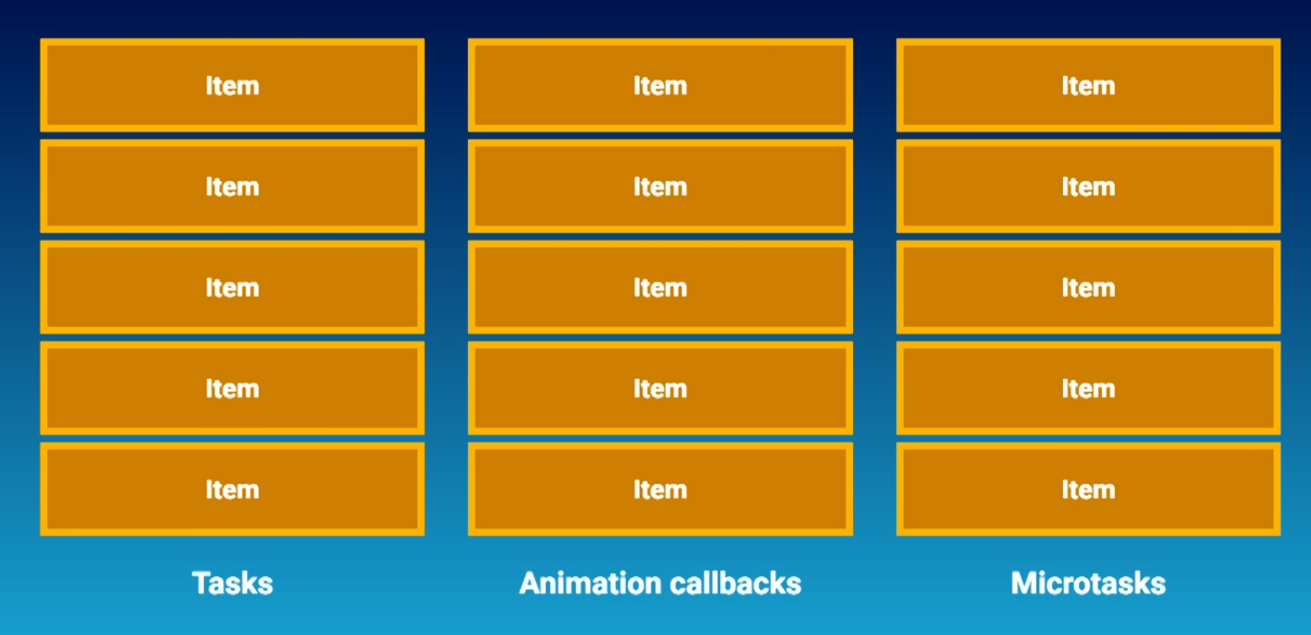
One Event Loop Turn
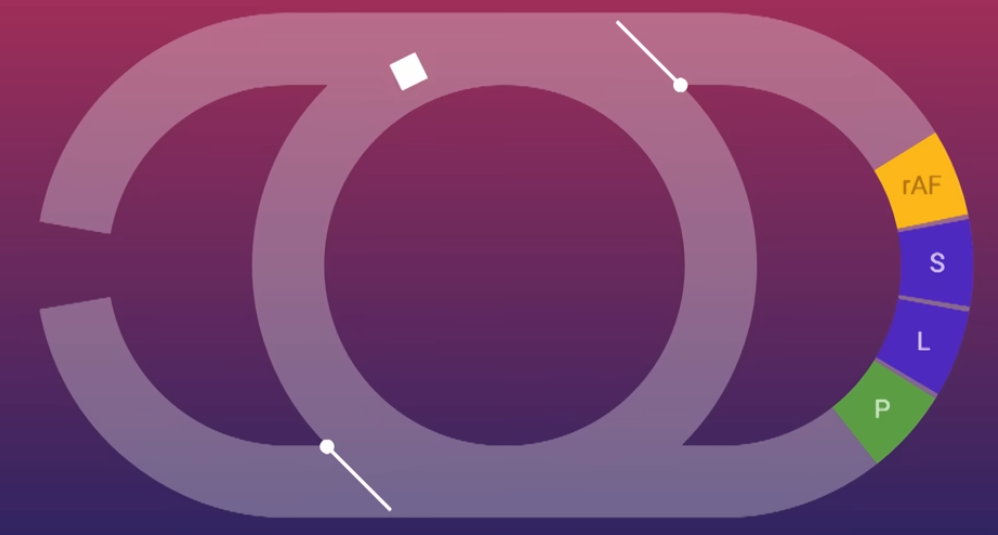
A simplified browser event loop turn looks like this:
- Pick one task from a task queue and run it to completion.
- When the JavaScript stack is empty, drain the microtask queue to completion.
- Potentially update rendering:
- run
requestAnimationFramecallbacks, - calculate style,
- perform layout,
- paint,
- composite.
- run
- Repeat.
This is simplified because browsers have multiple task sources, prioritization, throttling, and implementation details. For interviews, the key ordering is:
task -> all microtasks -> maybe render -> next taskTasks
Tasks are units of work scheduled onto the event loop. People often call these “macrotasks,” but the browser/spec language is usually just “tasks.”
Common task sources:
- Initial script execution.
setTimeoutandsetIntervalcallbacks.- DOM events such as click, keydown, input, and scroll.
postMessage/MessageChannelcallbacks.- Some network and browser API callbacks.
Important details:
- The event loop runs one task at a time.
- Each task runs to completion; JavaScript is not preempted midway through a function.
setTimeout(fn, delay)does not mean “run exactly after delay.” The delay is the minimum time before the callback becomes eligible; actual execution depends on the call stack being empty and the task queue order.- If a task takes too long, input, rendering, timers, and other callbacks wait.
- Long tasks are a common cause of UI jank and poor Interaction to Next Paint (INP).
Microtasks
Microtasks run after the current task finishes and the call stack becomes empty, but before the browser proceeds to the next task and before the browser usually paints.
Common microtask sources:
Promise.then,Promise.catch, andPromise.finally.async/awaitcontinuations after an awaited promise settles.queueMicrotask.MutationObservercallbacks.
The critical behavior: microtasks are drained to completion. If a microtask schedules another microtask, that new microtask also runs before the event loop continues.
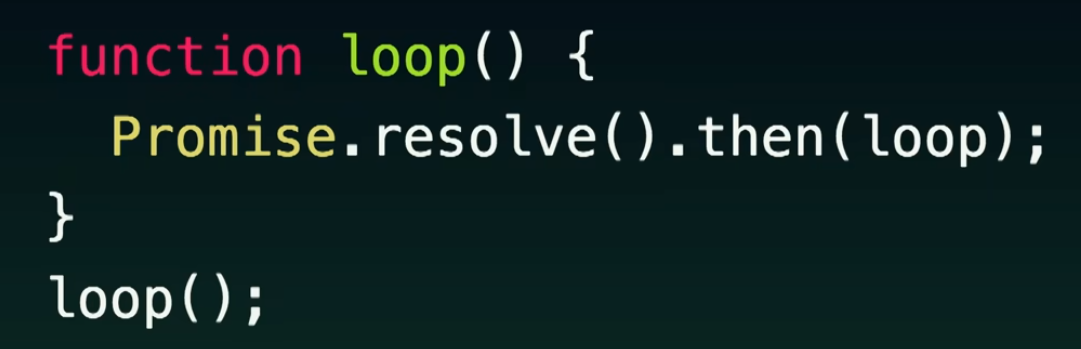
That makes microtasks useful for cleanup and consistency after synchronous code, but dangerous for large or unbounded work. A self-scheduling microtask loop can freeze rendering because the browser never gets back to the rendering phase.
function freeze() {
  Promise.resolve().then(freeze);
}

freeze();
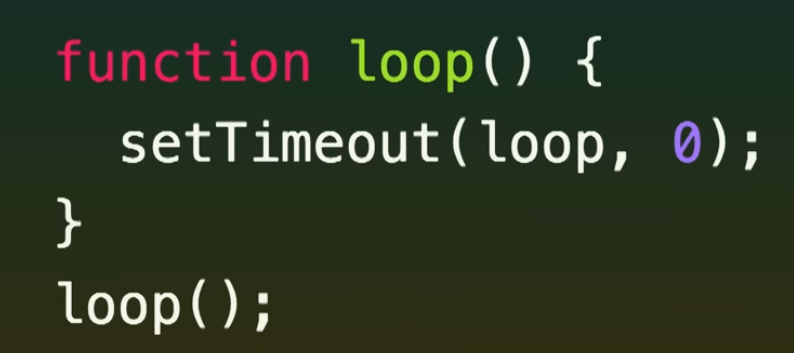
By contrast, a self-scheduling task yields between iterations, so the browser has chances to process input and render.
function yieldToBrowser() {
  setTimeout(yieldToBrowser, 0);
}

yieldToBrowser();
The second example can still waste CPU, but it does not starve the event loop in the same way because each timer callback is a separate future task.
Rendering and requestAnimationFrame
Rendering is not guaranteed after every task. The browser decides whether there is anything worth rendering and whether the page is eligible to render.
Key points:
- Most displays refresh around 60Hz, which gives roughly 16.7ms per frame. High-refresh displays have a smaller budget.
- The browser will not paint more often than the display can show.
- Background tabs and hidden pages are heavily throttled; rendering steps and timers may be paused or delayed.
- If nothing visually changed, the browser may skip rendering.
- Rendering requires the main thread to be available for the relevant work.
requestAnimationFrame is the right API when work should be aligned with the next paint.
Use requestAnimationFrame for:
- Reading frame time.
- Updating animation state.
- Applying visual DOM or canvas changes immediately before paint.
- Batching visual work to avoid redundant updates.
Do not use setTimeout(fn, 16) as a replacement for requestAnimationFrame. A timeout schedules a task after a delay; it does not guarantee alignment with the browser’s rendering cycle.
Why Promises Run Before setTimeout
This classic interview question is about task vs microtask ordering.
console.log("A");

setTimeout(() => console.log("B"), 0);

Promise.resolve().then(() => console.log("C"));

console.log("D");
Output:
A
D
C
B
Reason:
AandDrun synchronously in the current task.setTimeoutschedules a future task.Promise.thenschedules a microtask.- After the current task finishes, the microtask queue drains before the next task is selected.
async Does Not Mean Non-Blocking
async/await improves control flow, but it does not move CPU work off the main thread.
button.addEventListener("click", async () => {
  await fetch("/data");
  expensiveSynchronousRender();
});
The network wait does not block the main thread, but expensiveSynchronousRender() still does. Once the promise continuation resumes as a microtask, any heavy synchronous code runs on the main thread and can delay input and paint.
async alone does not make code asynchronous. It makes the function return a Promise, allows await, and converts thrown exceptions into rejected promises. Everything before the first await behaves like normal synchronous JavaScript.
async function f() {
  heavyCalculation(); // Still synchronous and blocks.
}
Even this blocks if heavyCalculation() is CPU-heavy:
async function f() {
  await heavyCalculation();
}
JavaScript must run heavyCalculation() first to get the value that await will receive. If the function does not return a pending Promise and instead performs CPU work directly, the event loop is blocked until that work finishes.
When JavaScript reaches an await:
- It evaluates the awaited expression and checks the resulting value or Promise.
- If the Promise is not settled, it pauses only the async function.
- It registers the rest of the async function as a continuation.
- That continuation is scheduled as a microtask once the Promise settles.
- The current task keeps running until the call stack is empty.
- Then the event loop drains the microtask queue and resumes the async function.
Conceptually:
await promise;
rest();
is similar to:
promise.then(() => {
  rest();
});
Even an already fulfilled Promise still yields:
console.log(1);

(async () => {
  console.log(2);
  await Promise.resolve();
  console.log(3);
})();

console.log(4);
Output:
1
2
4
3
The continuation after await becomes a microtask, so it runs after the current synchronous task finishes.
Senior interview framing:
- Async I/O helps avoid blocking while waiting.
- CPU-heavy JavaScript still blocks the main thread.
- Expensive work should be reduced, chunked, deferred, or moved to a Web Worker.
- JavaScript concurrency is cooperative, not parallel by default.
- Understanding call stack → task queue → microtask queue → render is more useful than memorizing queue names.
Practical Scheduling Choices
Use the scheduling primitive that matches the user impact:
| Need | Good fit | Why |
|---|---|---|
| Run after current synchronous code before paint | Microtask / promise | Keeps state consistent before the browser continues |
| Respond to user input | Small event task | Keep handlers short so input remains responsive |
| Align visual updates with paint | requestAnimationFrame | Runs before the next render opportunity |
| Run non-critical work later | setTimeout, requestIdleCallback, scheduler APIs where available | Yields more important work first |
| Do CPU-heavy work | Web Worker | Moves computation off the main thread |
| Break large main-thread work | Chunking with tasks | Gives the browser chances to handle input and rendering |
Use microtasks sparingly for scheduling. They are high-priority relative to rendering, so they are a bad fit for long work.
Performance Failure Modes
Common event-loop-related production issues:
- Long tasks block input and paint.
- Promise chains or recursive microtasks starve rendering.
- Excessive synchronous rendering after async data fetches makes “async” flows still feel frozen.
- Layout thrashing from repeated read/write DOM cycles burns frame budget.
- Timers used for animation drift, get throttled, and run out of phase with paint.
- Background tab throttling breaks assumptions about exact timer timing.
- Main-thread CPU work competes with hydration, event handling, layout, and paint.
Mitigations:
- Keep event handlers short.
- Measure long tasks, INP, Total Blocking Time, and frame drops.
- Split large work into chunks.
- Use virtualization for large DOM lists.
- Batch DOM reads and writes.
- Use
requestAnimationFramefor visual updates. - Use workers for parsing, compression, syntax highlighting, data processing, or other CPU-heavy work.
- Avoid infinite or unbounded microtask chains.
Browser vs Node.js
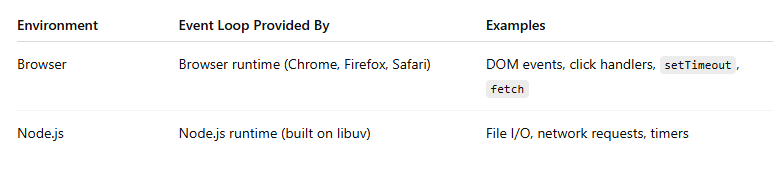
The event loop exists in both browsers and Node.js, but the host environment and implementation are different.
Browser event loop:
- Coordinates JavaScript, DOM events, Web APIs, microtasks, and rendering.
- Has rendering-specific concepts such as
requestAnimationFrame, style, layout, paint, and compositing. - Is tightly connected to user input and visual responsiveness.
Node.js event loop:
- Is built around libuv.
- Coordinates timers, I/O callbacks, polling, check callbacks, close callbacks, and microtasks.
- Has Node-specific APIs such as
process.nextTick,setImmediate, filesystem I/O, and server/network I/O. - Has no DOM or rendering pipeline.
Important Node-specific detail:
process.nextTick(...)process.nextTick exists only in Node.js and has no browser equivalent. It is even higher priority than the normal promise microtask queue in Node’s scheduling model, so overusing it can also starve I/O.
What V8 Provides
V8 is responsible for:
- Parsing JavaScript.
- Compiling JavaScript to machine code.
- Executing JavaScript.
- Managing the JavaScript call stack.
- Garbage collection.
- Promise machinery as part of the engine/runtime integration.
What V8 Does Not Provide
V8 does not provide browser or host APIs:
- Event loop policy by itself.
setTimeout.fetch.- DOM.
- Rendering.
- File system access.
- Network access.
V8 is a JavaScript engine. It executes JavaScript. The browser or Node.js runtime supplies the host APIs, owns the event loop integration, waits for async work to complete, and schedules callbacks back into JavaScript.
Without the host event loop, JavaScript’s async programming model through callbacks, promises, and async/await would not be useful for real I/O or UI work.
Staff-Level Framing
At senior/staff level, the event loop is a systems design topic for frontend architecture:
- It explains why main-thread ownership is a product concern, not just an implementation detail.
- It connects API choices to user-perceived latency.
- It forces tradeoffs between consistency, responsiveness, throughput, and battery.
- It determines whether expensive work belongs in the interaction path, a render frame, an idle period, a worker, or the server.
Good interview close:
“I care less about memorizing queue names and more about protecting the user’s frame budget. The event loop tells me when my code can block input, when it can starve paint, and which scheduling primitive gives the browser room to stay responsive.”